Let's Adore Jesus-Eucharist! | Home >> Varia >> Software Engineering
1) Warnings
2) Computer Science is a rubbish bin because of Original Sin
3) My ideal computer
4) Some general rules for choosing a computer
5) What hardware options should I chose?
6) What software should I get?
7) Accessories
8) How should I buy and setup my computer?
9) Why not a used computer?
10) Why not Linux and free "Open Source" software?
11) Why not just a smartphone?
12) Acknowledgments
1.1) Purchasing advice. See the Legal Consideration #18 concerning purchasing suggestions made on this web site.
1.2) Target audience. This advice is for the computer-illiterate. If you're a geek, don't read this to learn something, but to suggest improvements to me.
1.3) Details on vendors. For more information on the products and vendors mentioned here, please consult your favorite Internet search engine.
1.4) Beware of outdated advice. Things change fast in the computer world. (This article was last updated 2025-June-18.)
1.5) My advice is biaised by what computer I use, and how I use it. I currently use old laptops and only very simple software. I'm the exact opposite of a "power user": I mostly fiddle around with text files, answer e-mails and surf the Internet. In a way, I consider my computer to be an old mechanical typewriter (yes, I learned to touch-type on an old Underwood, in junior high school), but a mechanical typewriter that has a really long roll of paper, and that can magically erase when you make a typo!
Many years ago when I was a programmer in the USA, I remember hearing about an engineer who would always sign off his e-mails with the wish: "May all your problems be technical".
One of the first problems I have with computer illiterates who ask me for some computer advice is that they think the problem is technical. Normally, that's not the case. Mankind has pretty well solved all computer problems. Mankind has the knowledge to build excellent computers that are small, inexpensive, user-friendly, rugged, etc. The problem is not technology. The problem is Original Sin.
How does Original Sin harm computers? Here are a few examples:
2.1) Non-removable or non-standard batteries. Most computers have a rechargeable battery which is non-standard and difficult to replace by the user. Since this battery will eventually wear out, you'll have to buy a new computer, or pay a lot for the manufacturer to replace it. Moreover, you can't have several fully-charged batteries, so you could continue to work during a power outage.
2.2) Software that doesn't belong to you. You pay for them, but the manufacturer remains the owner, and can force you to "re-buy" them over and over again, year after year. (A recent variation on this theme is rented software that lives "in the cloud".)
2.3) Private file formats. Some programs take your data and put them in non-standard, private file formats. Your data (which belongs to you) becomes in a way hostage of that software manufacturer.
2.4) Cloud Computing. "Cloud Computing" is just a marketing expression which means your data and software no longer stay on your computer, but are kept "in the cloud" ("cloud" meaning "Internet"), on a big shared computer, under the full control of somebody other than you.
Many years ago computers were so expensive that only large companies and the military could afford them. So it made a lot of sense to allow many users to share a single remote computer. But these days there are probably computers in your telephone, your microwave oven, even your washing machine and your kettle! So forcing many users to put all their data and software on a single remote computer really is "worse than stupid".
2.5) Computer fads. Computer manufacturers love it when a whole herd of captive clients rush to the left or to the right to buy new computers. So they like fads. Often these fads are based on new shapes of computers. Careful, it's easy to be cute when you don't need to be practical. Don't forget the computer as such takes up almost no place. If you take the "brains" of a computer (CPU and RAM), and you grind it up with a mortar and pestle, you'll probably be able to fit it inside a thimble (and miniaturization continues!). What is big is the battery, screen and keyboard. So if you get rid of one or more of these elements, you can easily have a computer that looks really pretty in the showcase.
2.6) Planned obsolescence. Another way manufacturers get customers to buy more is to build computers that self-destruct after a short period of time. (There are no technical hurdles to building an inexpensive computer that should last a lifetime.) Another twist on planned obsolescence is somehow connecting the computer to something that manufacturers can change, forcing everybody to buy new computers. For example, "software bloat", whereby manufacturers increase the size of the operating system such that users have to buy more powerful computers. Another example is telecommunication: increase the speed of the network a little bit as a pretense to change the network protocol a lot, so users have to buy new telephones to stay connected.
2.7) Trap doors built into your hardware and software. More and more, corrupt Governments force computer manufacturers and telecommunication companies to insert "trap doors" into computer hardware and software, so they can spy on their own citizens. And of course, nothing prevents manufacturers from using such trap doors for themselves. The very existence of a general-purpose computer, in the hands of We the People, is deeply repugnant to anti-democratic forces.
2.8) "Buy me now!" user interfaces. If you study human-computer interfaces, you'll notice that often there is unnecessary complexity. Instead of making simple interfaces that allow the user to get some work done, manufacturers often try to place advertisments for their products, or put on audio-visual shows to entertain and attract. I angrily swing my machete in the jungle of pop-up messages and flashing lights and warnings for this and please click here for that and automatic "improving" of what you're trying to type over here and automatic starting up of programs you don't need over there and wait your computer has frozen because it's automatically downloading humongous updates for software you don't even want. Because of constant machete-swinging on my own computer, I tend to forget this state of things. So when a computer illiterate asks me for help and I sit down in front of his computer, I'm often totally overwhelmed by an outburst of unecessary complexity.
2.9) "No, let's do it my way!". In the world of open-source software, greed is less present, but human pride and stupidity unfortunately more than compensate. You don't like something in the software (or you've had a e-mail flame war with somebody on that project)? Fork the project, and start adding incompatibilities!
2.10) New features, old bugs. Fixing existing bugs is hard and boring work. And bragging about bug fixes tends to draw the client's attention to the fact you sold him some really sucky software. Adding new features is fun, and makes clients want to buy the new version. So software normally accumulates new features while accumulating new and old bugs.
Etc, etc.
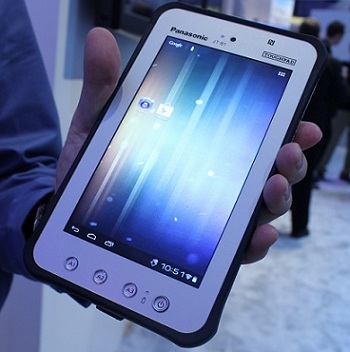
As we speak, it would be relatively easy for a manufacturer to build a computer that would be:
- Completely open (public and rights-free hardware and software).
- Quite small and fairly light (for example, roughly the size and weight of a
Panasonic Toughpad B1 - 7 in. Android).
- Equipped with a touchscreen (at home I'd use a big external keyboard and a
big external monitor, but with the "pop-up keyboard" on the touchscreen, I
could still enter data in a pinch).
- Impervious to rain, fairly resistant to cold and shocks.
- Without an annoying cooling fan.
- Powered by AA cells (not AAA, nor a proprietary battery format).
- Able to run normal open-source software like "Libre Office" and some
usable e-mail software.
- Equipped with a normal USB port (to transfer documents by sneakernet,
to connect an external keyboard, etc.).
- Equipped with a port to connect a large external monitor (I imagine
HDMI Type D).
- Able to connect to a wireless network, but also equipped with a physical
switch to cut all network connections.
- Devoid of non-removable mass storage. There would be at least two
easily-accessible internal slots for removable mass storage devices (I still
like spinning rust, i.e. hard drives, but it could be SSD too). Because there
would be no hard-to-remove mass storage, you could lend your computer to a
perfect stranger (or borrow his), just by swapping out the hard drive. Since
there would be two slots, you could back up your data just by plugging in your
other hard drive and copying everything from one to the other. (This also
has the beneficial side-effect of defragmenting your hard drive.)
- Unable to boot from removable media. In other words, the operating system
would be burnt into a ROM chip soldered on the motherboard, once and for all.
Notice I said ROM, and not EEPROM or some other modifiable thing. ROM as in
the only way to patch this operating system is to rip out the physical chip
and to solder a new one in. There would never be any operating system updates,
because it would be simple and well-programmed. No
rootkits could ever be installed. If for whatever reason you caught a computer
virus, you would just take out the batteries, unplug the power cord (if it was
connected), wait a few seconds, then plug it back in.
- Unable to "autorun" anything. In other words, there would be no way to
configure this computer (either by the user or programmatically) to make it
automatically do something. In other words, if you double-click on a virus,
you're infected and it's your fault. Otherwise, you can never get infected.
- And of course, all the software would be coded in
GePSyPL!
As we speak, I'm not aware of such a computer being available for sale. If I'm wrong, please call me urgently!
Given the main obstacle to a good computer is Original Sin, and given that there currently isn't a good computer you can buy (as far as I know), what are some general rules for choosing a less-than-ideal but existing computer?
4.1) The computer is almost irrelevant; it's your data that counts. Computers are more like a liter of milk, than a bottle of wine. A computer is not an investment which increases in value, like a bottle of good wine. It's something that quickly becomes stale, even if you don't use it, like a liter of milk. Don't worry too much about the hardware and the software. Try to find a computer that lets you keep control of your data.
4.2) Miniaturization is expensive. All else being equal, a smaller computer will always be more expensive than a big one. Smaller computers also have a tendency to be harder to fix, to lag behind big computers in speed, and to be stolen more often.
4.3) Buy a portable computer. Portable computers have disadvantages (see above), but the advantages handsomely compensate:
4.3.1) Mobility. You can take it with you to work, while traveling, in school, elsewhere in your own house (to have peace and quiet!), etc. You therefore always have with you your addresses, your music, your pictures, your work documents, your correspondence, your books, etc.! So cool!
4.3.2) Small size. Few people have too much space where they live. Even if you never carry it around, a portable computer is still handy, if only for the fact it uses up so little space.
4.3.3) Health. You can work in other positions: standing up, lying down in bed, sitting in your rocking chair, etc. (Important among others for people who have back problems.)
4.3.4) Tech support. If you're "computer-illiterate", you can easily take your portable computer to a "nerd" so he can solve your problem and explain how to do things. Don't underestimate this advantage!
Etc., etc.
4.4) Buy two identical computers, or a good guarantee. Computers break down (whether the hardware or the software!), and are relatively hard and costly to fix. Ideally, when you find the computer which is appropriate for you, buy two. (A few years ago, that approach would have been unthinkable because computers were too expensive, but these days it's easy.) When your computer breaks down, you just take your spare computer and bingo! Problem solved!
If for some strange reason you can only have one computer, at least take a good guarantee. Careful, all guarantees are not equal! A bad guarantee is almost worthless, because when your computer breaks down, you put it in a box, mail it to them, then wait..., wait..., wait... A real guarantee is when you can go back to the store and they will give you a new one, or they will send a technician where you are, at home or at your office, within 24 or 48 hours.
4.5) Be wary of second-hand computers. It's often a bad idea to buy used. (Among others because of #4.1, #4.4, etc.)
4.6) Unfortunately, as far as I know, no manufacturer is vastly superior to the others. I've personally had, or have heard of "horror stories" about most brands (Apple, Dell, Acer, Toshiba, Compaq-HP, Sony, Lenovo, etc.). This seems confirmed by the fact that many sub-components of all these different computers often come from the same manufacturers.
4.7) Fortunately, many of the brands and models are tolerable. If you buy a brand-new portable computer, with an identical backup or a good guarantee, as well as the hardware options, software and accessories listed below, and that your computing needs are ordinary, you'll probably be satisfied.
Normally there aren't too many choices to be made in the hardware options for your portable computer. Nevertheless, I can mention:
5.1) Don't insist on the CPU. The CPU (the "brains" of the computer) is generally not used very intensively. Unless you do a lot of geeky work like numerical computing, or image processing, etc., whatever you get will probably be powerful enough.
5.2) Insist on the monitor, the keyboard (and if applicable, the touch pad). We spend most of the time staring at the monitor, typing away on the keyboard, and "mousing around" on the Touch pad, so it's worthwhile to get good ones.
Careful, some portable computers don't have touch pads! Also, some portable computers have keyboards that are so small they make typing a chore. Be also careful with size exaggerations in the other direction. A "portable" computer with a huge screen isn't portable anymore! It looks nice in the showroom, but afterward it just turns into a boat anchor. You're better off with a separate external monitor, if you really need something big. (I've been working all day for years on a normal laptop screen of about 21cm x 28 cm, or 8x11 inches.)
Small detail for the keyboard: I've come to appreciate backlit keyboards. I can touch-type, but because many "command" keys (i.e. everything apart from the letters and numbers) are scattered far away and vary from one keyboard to the next, and because I like to work in places that are not always well lit, it's nice to see my keyboard.
Recent personal anecdote: around mid-April 2025, I tried to buy another laptop on the Internet, but was stunned when I opened the box: the keyboard had a full-size numeric keypad! So the idiots made all the keys of the keyboard smaller, so they could fit a stupid keypad! (Which you can just buy separately and connect when you need it.) So the keyboard was much smaller than usual, and smushed sideways to the left. Every time started typing, weird characters appeared, and I had to very carefully set my hands back in the right place. The "Enter" key was so small I usually hit a number on the keypad! Idiotic. Incredibly stupid. Yet another thing you need to watch out for...
5.3) Enough RAM, hard drive space, and network connectivity. The definition of "enough" changes often. Let's say these days if you use bloatware from Microsoft, you need a minimum of about 4 Gigabytes of RAM, and about a half-Terabyte of hard drive space. I don't think you can buy portable computers these days without a LAN card or a wireless connection, so you probably don't need to worry about network connectivity.
5.4) Other hardware options you might need. In theory, you can remove rarely-used things from a computer, and just add them externally and temporarily if ever you need them, like dial-up modems, internal CD-ROM/DVD/Blu-Ray drives, 3.5" diskettes, PC-Cards, etc. You can also make your computer much smaller by removing all kinds of connectors, like RS-232, parallel, RJ-45, various proprietary docking connectors, etc. I guess the more something is often used, the more sense it makes to buy it already included in your portable computer. Personally, I still currently prefer to have the keyboard and the main monitor integrated into my portable computer (a "laptop"), because my eyes suck (I need a large screen) and I'm also a content producer, not just a content consumer (hence I need a real keyboard).
5.5) Hardware options you probably don't need. Many manufacturers try to attract buyers with gadgets: built-in webcams, fingerprint readers, fancy speakers, etc.
For software, you basically have a choice between the "Microsoft universe", the "Apple universe", the "Google (i.e. Android) universe", and the "Linux and Free Open-Source" universe (or FOSS). You'll need the following software:
6.1) An operating system. Normally, when you buy a computer, the operating system is already installed. (The operating system is, by definition, a kind of bridge between the hardware and the software worlds, so it has a tendency to be a bit "prisoner" of the hardware to which it is adapted.)
6.2) An office productivity suite. These days, you can get a "productivity suite" that will provide you with just about all the software you will ever need: a web browser, something for e-mail, a word processor, a spreadsheet, etc. Microsoft has "Office". A rough equivalent in Open Source might be "Mozilla Firefox" (web browser), "Mozilla Thunderbird" (e-mail) and "Libre Office" (the rest of the productivity suite).
6.3) Maybe an anti-virus and a firewall. The world is unfortunately filled with nasty people who will try to break into your computer to take your money or damage everything. (It's worse in the "Microsoft universe".) A firewall is a kind of border guard that sits on your network connection: it tries to prevent un-authorized passage. An anti-virus is a bit like the macrophage cells which patrol inside your body: it snoops around to try to find "germs" to eat up.
I never liked anti-virus software, and my dislike is getting worse. Anti-viruses are normally expensive, slow down the computer, hog the network connection to get their daily virus description files, often scream "Wolf!" even though there's no threat, sometimes remain totally silent while you're being infected, often aren't even able to kill the "germs" they do detect, and are (for mere mortals) impossible to test (unlike a smoke detector, for example, under which you can light a small piece of string or something harmless that gives off smoke). So I'm leaning more and more toward a separation between my "pure" and my "impure" computers.
6.4) No illegal copies of software (or music, or films, etc.). It's not because it's easy and quick to make an illegal copy of a file that we have a right to rob people! Thou shalt not steal. One of the many advantages of honesty is that if you buy all your software, you'll always have enough room on your hard drive, and you'll probably become more productive with the few legal programs you have (since you won't waste time with illegal software).
There are a few computer accessories you should buy, and some you might find useful:
7.1) Several memory sticks for your backup copies. You need at least two, because one stays in your wallet, and the other at home. If your laptop is at home and your house burns down, you have your copy in your wallet. If you're on a trip with your laptop and everything gets stolen, you have your copy at home. Make backup copies at least once a week, with an identical content on all memory sticks!
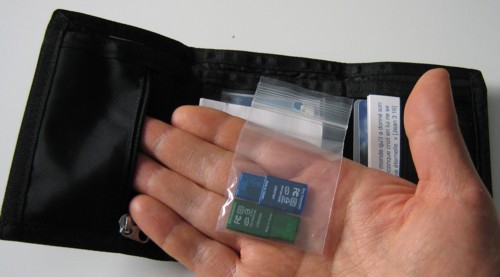
The most important accessory: backup copies, in a ziploc, in your wallet.
7.2) An Internet Service Provider (ISP). Normally, you have to pay an ISP to connect to the Internet. In my opinion, a high-speed Internet connection is something you can do without, if you just want to do e-mail and surf the Internet a bit. Moreover, a wireless router (which lets you walk around your house while remaining connected to the Internet) is not essential. But some Internet connection is necessary.
Your ISP will generally also provide you with an e-mail address. By the way, try to have an e-mail address that is complete and readable, like "henry.albert.smith@mediom.qc.ca", and not something like "jeepers@hotmail.com", etc. Your e-mail address is the modern equivalent of a business card, so people have to be able to read your name! Moreover, when you get your "username", it's better to get also an "alias", and to only use your alias for e-mail. This will make it easier to change e-mail addresses when the spammers find you.
7.3) A surge protector. It's not expensive, and can protect you against damage caused by lightening, or the surges caused by Quebec Hydro. Careful, a surge protector isn't just a power strip with a fuse and several outlets. It must contain electronic components to protect the computer and the modem from voltage surges. In North America, a UPS (Uninterruptible Power Supply) is probably unnecessary, since your outlet will provide fairly high-quality electricity, and your computer battery will take over automatically during power outages.
7.4) Noise-suppressing stereo headphones. See The Porta-Chapel.
7.5) Maybe a mouse. On a trip, the touchpad is enough, but at home, several people (myself included) prefer a good old external mouse.
7.6) Maybe a printer. I try to avoid printing as much as possible (it's expensive, the information is quickly out of date, it takes up space, etc.). I only print official documents that must be signed, or things we have to send and can't be e-mailed, etc. If you have a good friend who has a printer, you might avoid printers altogether. Prices for laser printers keep getting lower. Inkjet printers are currently a rip-off, unless you refill your cartridges yourself. I haven't yet found an honest and unbiased web site that gave the cost per sheet for all printer models (with a thorough cost estimate, including purchase cost, ink costs, maintenance costs, etc.). I currently prefer inkjets, they are cheap (if you print rarely like me), they can do color, and they can digest thin cardboard (so I can print out pre-cut business cards). Last time I bought one, I just walked into the store and took the least-expensive inkjet they had, and it still gets the job done, and still robs me everytime I buy a ink cartridge (so I stay away from paper copies).
7.7) A special computer bag is an invitation for thieves. Some people, after having spent a lot of money on a portable computer, buy a pretty little customized computer bag. I prefer a good daypack that is stylish, which not only doesn't attract the attention of robbers, but can contain in addition to the computer, things like your coat, your lunch, your Porta-Chapel, etc.
Before, I would go on the manufacturer's web site, configure my laptop, save the configuration and price to sleep on it, and also to show it to somebody smarter than myself, and the next day I go back on the site with my credit card and order the computer. Normally in less than a week I had the computer. I never had any problems. (You can also choose your configuration, then wait a few weeks for discounts. Sometimes it pays!)
Several of my recent portable computers were just purchased at Amazon, because I'm starting to listen to my own advice.
Installing new hardware and software is no longer a problem (especially if you can borrow somebody's high-speed Internet connection to download all the stuff you need). The hard part (in my opinion) is first ripping out all the software junk that comes with your new computer. I always take several hours to perform this initial cleaning up. It makes the computer much faster to start up, clears up all the clutter on the screen (and the hard drive), simplifies daily use and maintenance, and reduces the chances of virus infections. Basically, remove everything you can!
I purchased the first used computer in my life on 2020-June-18. Destiny really had to twist my arm in order for me to overcome my fear of used computers! (It was during Trudeau's pseudo-pandemic when I had lost my job. That's the moment when my computer utterly and completely died on me.) I purchased it in a panic, from a local shop (which I wouldn't recommend), a shop that I had randomly found on the Internet, for the eye-watering sum of 600$.
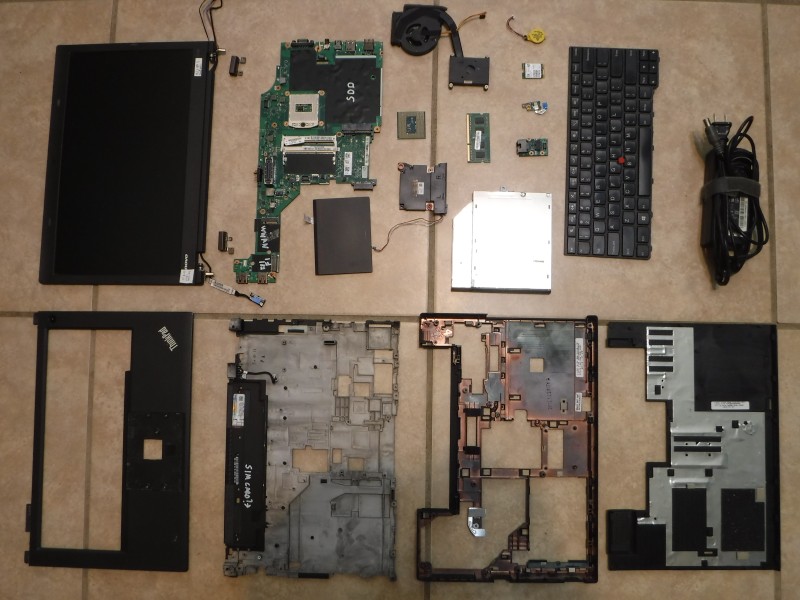
Autopsy of my late Lenovo Thinkpad T440p.
About five years later, I tried to buy a new computer. What a painful experience! Among others, I was forced to migrate to Windows 11. Of course, first I had to deal with the avalanche of totally unecessary little changes, which I was expecting. (It's as if terrorists came into your kitchen, then emptied all drawers and cabinets into a big heap in the living room, then put back all the objects, randomly, in any drawer or cabinet. Yes, you didn't lose anything, yes, everything is still in your kitchen, but you now have to spend an inordinate amount of time finding everything.) But afterward, new torture: you absolutely need a Microsoft account to open your own laptop! No way to set it up without such an account. But worse, you need to enter your password every time you open your computer! I did battle for hours trying to remove that, but I only succeeded in bricking my laptop. I had to call the company, speak to an ESL (English as a Second Language), and re-image the hard drive (fortunately, I had a high-speed connection with RJ-45), after having jumped through hoops with "BitLocker" and its 49 digit-long password, for Microsoft to grant me the great privilege of being able to do what I want with my own computer. To make a long story short, a painful experience. Satan controls my computer...
In a providential outburst of anger, I returned my brand new computer, and I went on Amazon in the off chance they sold old Lenovo Thinkpad T440p. Yes! And for 130$ a pop! Since I was used to paying over one thousand dollars per computer, I bought one. Then, since the seller (techrefurbs.com) seemed just as fine as their product, I bought two more a few days later. Then another one to make sure I wouldn't run out! I'm used to this model, my fingers know the keyboard, the battery is removable, new replacement batteries are available on Amazon, the inside of the computer is not too miniaturized so I can understand a bit what is going on, etc.
What is even more fun is that Solid-State Drives (SSD) are now very affordable, less than 20$ for 128G (which is vastly sufficient for my needs). With a SATA-to-USB cable worth about ten dollars, and a little open source program (Rescuezilla), I can clone my hard drives. So I install my software once, I configure everything according to my preferences, I copy my data (including all the books which previously took up many bookshelves), and when everything is ready, I just clone my hard drive as often as I want. I can have as many identical copies of my laptop as I want! How delightful!
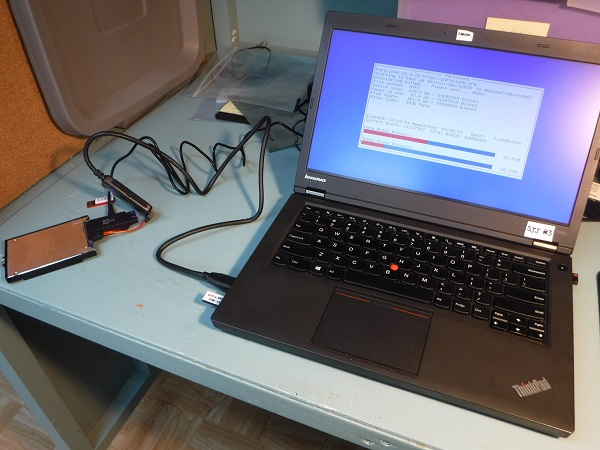
Cloning a hard drive with a SATA-to-USB cable and Rescuezilla.
So am I going to change my advice about buying used laptops? Yes, but still, it's preferable that:
- You are a geek;
- You're buying a computer of the same manufacturer and model than the one
that just broke (i.e. you have good spare parts you can use to replace the broken
parts of the "new" laptop you've just purchased second-hand, and that the seller
never mentioned were broken);
- You know how to clone an internal hard drive with a "SATA-to-USB" cable,
Rescuezilla and a bootable Linux thumbdrive;
- You had a working internal hard drive with all your software and data, which
when plugged into your "new" second-hand laptop, booted without problems and
allowed you to just continue working as if nothing had ever happened (no
need to install anything, no need to configure anything, it's just as if
you had made a brain transplant from your old laptop to the new one);
- You purchased this used computer from a reputable seller, or you thoroughly examined the used laptop before buying it, using the following checklist:
9.1) Pre-purchase inspection checklist for used laptops
- Bring your inspection tools. This checklist (on USB thumbdrive and paper copy), wireless mouse with antenna and battery, USB thumbdrive for test files (.TXT file to check keyboard, .MP3 file for sound test, video file for screen test), bootable USB thumbdrive to start under linux, earbuds, USB thumbdrive with any automated tests you have (MemTest86, CPU-Z, antivirus, etc.), and whatever else your laptop is supposed to handle (RJ-45, HDMI, SD card, CD-ROM, etc.).
- Physical inspection. Is it the actual laptop you were sold? (Manufacturer's name, model number, original stickers with the serial number; yes, my own paternal grandmother once took her expensive Swiss sewing machine to be repaired, and they gave her back another much cheaper sewing machine!) Are all the parts there? (laptop itself, power supply, battery, etc.) Look at each part, turning the part around so you see every side of it (including the laptop, and make sure the lid is flipped open): holes? big dents? cracks? worn out sheathing on electrical wires? other signs of abuse like dropping on the floor or spilling liquids? missing screws? loose hinges?
- Smoke test. Remove battery, plug in power supply, and start it. Does it boot? If so, is it unusually slow to boot? Once booted, put battery back in and unplug power supply. Does it stay on? (Leave it running on the battery during the rest of the inspection; it won't prove much if it runs for only a few minutes, but it will at least pick up seriously bad batteries.) Shut down and start up again. Everything still OK? Shut down again, but this time in "hibernation". Can it wake up from hibernation?
- Test drive. USB ports (all of them, one after the other, inserting your USB thumbdrive containing test files, and seeing if it recognizes it and allows you to see what's on it). Screen (start the video file on the USB thumbdrive; flickering? discolouration? brightness? dead pixels? look for display anomalies, adjust screen brightness all the way up and all the way down). Keyboard (open the .TXT file, test every single key, including Shift, Ctrl, Space, Enter, French accents, etc.). Optical mouse (plug in antenna, click, double-click, mousing around). Sound card (start MP3 file, check internal speakers, then ear buds, check volume controls). Wireless card (turn on and off, can you see networks? can you connect?). Touchpad (click, double-click, mousing around). And any other device that should work on that laptop (camera, RJ-45, HDMI, SD card, CD-ROM, etc.).
- Operating System and hardware. Open "My Computer" in Windows (or the equivalent in other systems), and check the capacity of the hard drive. It it what they said it was? Open "Start/Control Panels/System". Check the OS (Is it the OS you were sold? Is the copy genuine? Is it "activated"?), processor (is it what they sold you?) the RAM (how much?) Open "Start/Control Panels/System/Device Manager". Any weirdness displayed next to any device? It might be a good idea to write all these details down, since they are supposed to provide you with an invoice with all those details anyway, so you can compare.
- BIOS, Linux. Shut off the computer, then boot into BIOS (does it work? is the BIOS password-protected?). Make sure BIOS is configured to allow booting from USB thumbdrive. Shut off, insert linux USB thumbdrive and restart under linux. Does everything work under linux? Shut down again, remove bootable drive and restart. Does it restart normally?
- Automated tests. If you can, run some automated tests. MemTest 86? CPU-Z? Any other suggestions?
- "Inspection" of the seller. What is the seller's reputation? Does he dare do business in person, or does he hide behind an avatar on the Internet, without you being able to know who you're really dealing with? Do they give an invoice? A written garantee?
If you're not satisfied, get your money back and walk away. If faults you find aren't deal breakers, at least haggle for a discount if they weren't previously declared.

What I think of Linux on a bad day.
[Source]
I'd love to get rid of everything called "Microsoft". When I'll succeed in finding an "Open Source" version of Linux, and also of productivity software that lets me do roughly what I currently do with Microsoft Windows and Microsoft Office, I'll rush to tell you on this web site. I'd love to avoid giving my money to Bill Gates and other kleptocrates (they have enough already!). On the other hand, I have to earn a living with my computer, so things have to work.
For the past ten years or so, I would try Linux every 12 to 18 months. I should have taken notes, because I could have made a horror movie with my Linux anecdotes. My memory is going down the drain, and each one of these memories is separated by several months or even years, but I remember among others an infinite reboot loop (the computer would start up, then said it had encountered some nondescript problem, then it anounced it was going to reboot, which it did, to then get clobbered by the same problem, and re-reboot, etc. Incredible!), or opening a folder with "too many" files, which crashed the computer!, or my invoices for my Boss which had disappeared (actually, I would copy-paste a line from my spreadsheet into a text document, and after a few weeks, I opened that document and all the parts coming from the spreadsheet had disappeared from that text document!) My most recent attempt was defeated by Zoom (which I need to earn a living). Zoom on Linux blows up and crashes several times an hour... Another example: a boring ordinary document on "Microsoft Word", which opens in less than a second when I double-click on it under Windows, takes TWELVE seconds to open under Linux LibreOffice! (and I'm not talking about all the other bugs) But wait, there is more! I'm not comparing apples with apples! I'm comparing my old version of Microsoft Office from before the year 2000! (on an old CD-ROM, purchased for a lot of money a quarter of a century ago!) with the most recent version, freshly downloaded, of LibreOffice under Linux! Imagine a race at the Olympics, with the Linux athlete who starts to run twenty-five years before the other runners, but who still manages to lose the race!
It's sad that Linux is basically a failure. After over twenty years, and so many contributions by so many programmers from all over the world, the mountain has given birth to a mouse. Almost three hundred "distros" (incompatible flavors of Linux), each with several incompatible versions, and each version available with different "desktops" (Gnome, KDE, Xfce, etc.) themselves also mutually incompatible. What a computer Tower of Babel! What a museum of human stupidity! If Linux programmers converted to Jesus Christ, left aside their pride, and placed themselves under the orders of a good leader, Linux could soon trounce Apple, Microsoft, Google, Oracle, etc. Sad...
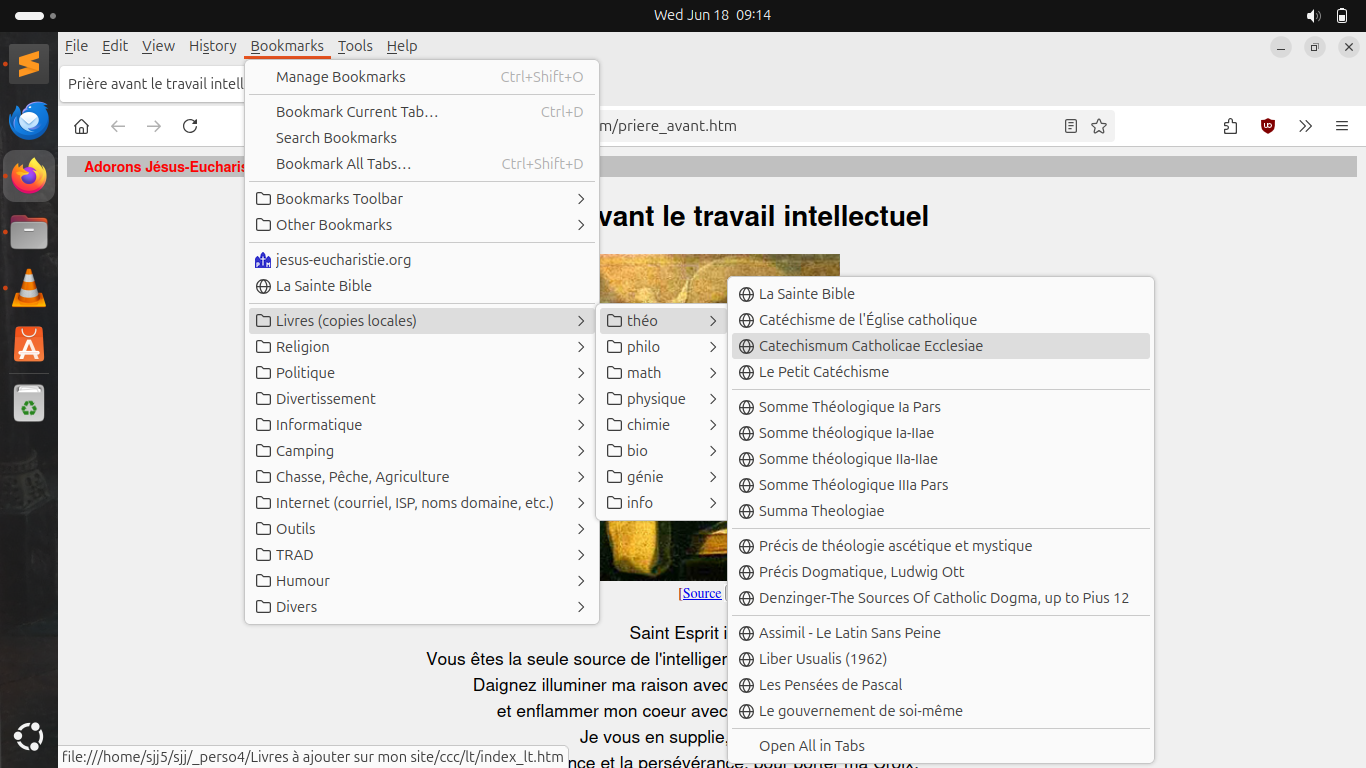
Local copies of my books, under Linux Ubuntu.
But I must say that in general Linux is gradually improving, and my latest attempt has been by far the least painful. I managed to install everything almost without effort. Almost everything worked, almost normally, if you didn't try to do anything complicated! Since I have to earn a living with Zoom, I have to keep a Windows computer, but for the rest of my computing needs (which are very simple), I currently use an old Lenovo Thinkpad T440p, running Linux Ubuntu 25.04, Sublime Text (I work mostly with very ordinary ".TXT" documents), Mozilla Firefox (with uBlock Origin) for the Internet as well as for reading books in ".PDF" format, Mozilla Thunderbird for my e-mails, and VLC to listen to Gregorian Chant. I manage, barely, to run my Breviary (Universalis) under Wine (some contraption to make Windows software think it's not currently running on Linux). Someday maybe Zoom will work under Linux, and then I'll be able to dump Windows for good.
Yes, my dream computer could easily have the format of a smartphone (i.e. a "palm-top"), but as far as I know, current smartphones are receding even further away from the desired goal.
I am responsible for all errors contained in this advice. What good is in this advice can be largely traced to Mr. Gaétan Corneau and Mr. Bertrand S.).
Let's Adore Jesus-Eucharist! | Home >> Varia >> Software Engineering